Orders and cash-on-delivery protection
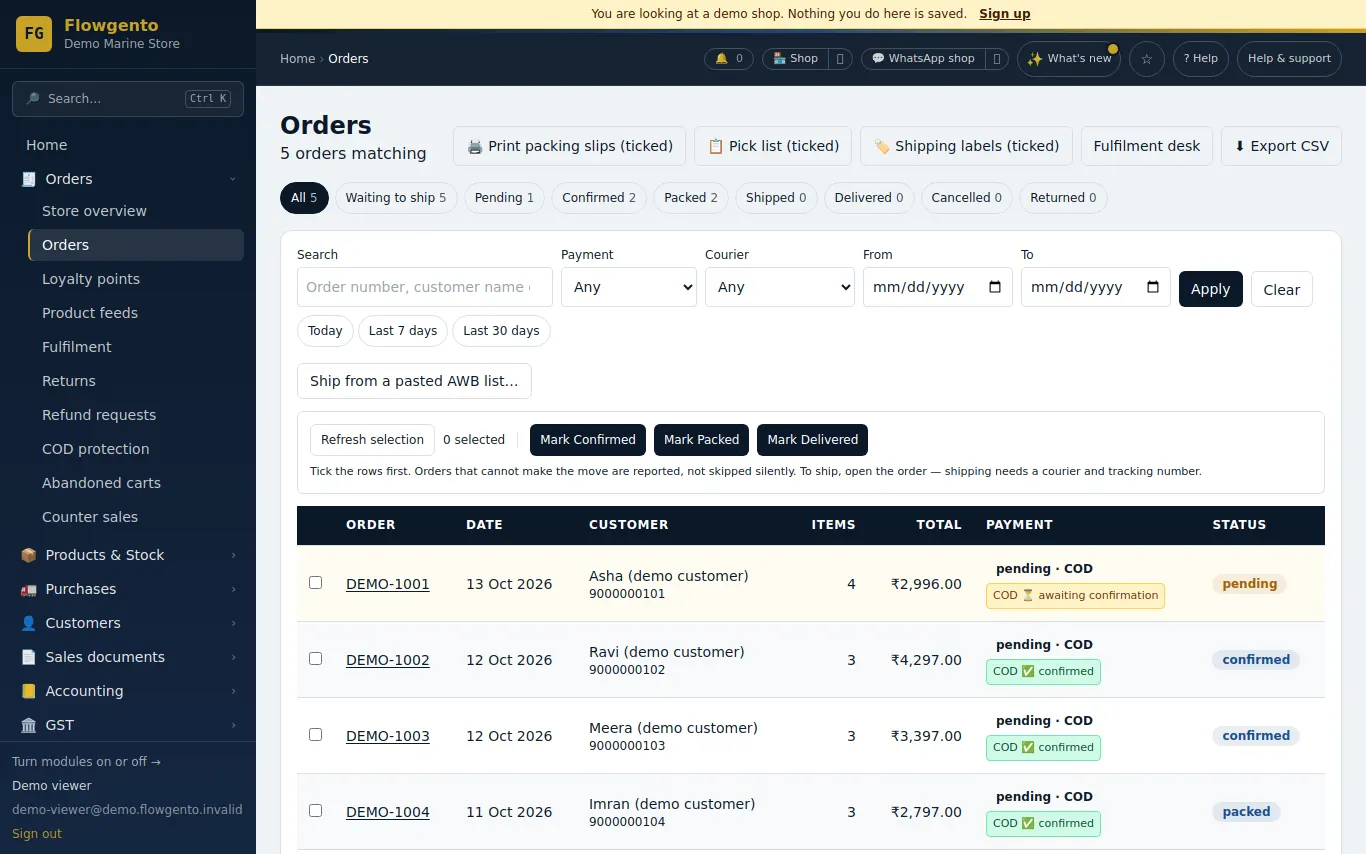
Every storefront order lands in one list with its status, payment and customer. The GST invoice is raised when you mark it shipped, and refunds raise credit notes.
How it works
- A new order arrives with a bell, an email and a phone notification.
- Confirm it (a cash order can be confirmed by the customer on WhatsApp), then pack it.
- Mark it shipped with the courier and tracking number — the GST invoice is raised at that moment.
- Mark it delivered; returns, refunds and cancellations happen from the same order page.
Fulfilment
- Confirm, pack, ship with courier name and tracking (AWB) number, mark delivered — one order or many at once.
- Ship many orders from a pasted list of AWB numbers.
- Packing slips for the ticked orders, one per parcel.
- Revise quantities and lines before shipping; cancel before shipping.
- A bell, email and phone notification when an order comes in (the seller panel installs on your phone).
Cash on delivery protection
- Ask cash customers to confirm on WhatsApp (or by email) — their answer confirms or cancels the order.
- Optionally cancel unconfirmed cash orders after a number of hours, and put the stock back.
- A cash-handling fee, a discount for paying online, a maximum cash order value, and pincodes where cash is not offered.
- A COD report: confirmation rate, cancellations and orders at risk of coming back.
Returns, refunds and carts
- Customers ask for a return from their order page; you approve or refuse, record what came back and its condition, and refund.
- Refunds through Razorpay or recorded as settled outside (cash, bank transfer), with a credit note.
- Abandoned carts after 4 hours, with an optional WhatsApp reminder.
See it in the demo shop
A read-only seller panel with invented data, reset every night.
Questions sellers ask
- When is the GST invoice created?
- When you mark the order shipped. Orders that are cancelled before that never get an invoice.
- Can a customer cancel an order?
- Yes, until it is shipped — cash on delivery or paid online. A paid order is cancelled at once and a refund request waits for your one-click approval.
- How does cash-on-delivery confirmation work?
- After a cash order, the customer is asked to confirm on WhatsApp (or by email). Their answer confirms or cancels the order; you can also auto-cancel orders that are never confirmed.
- Can I ship many orders at once?
- Yes. Paste or upload a list of order numbers and AWB numbers, check it, and ship them together.
How it works, step by step
- Orders and manual courier
Confirm, pack, ship with courier and AWB, deliver; cancel before shipping; bulk ship from a pasted list.
- Cash on Delivery protection
Ask COD customers to confirm, charge a cash-handling fee, give a discount for paying online, cap cash orders, and see which orders are at risk.
- Returns and refunds
The customer asks from their order page; you approve or refuse, record what came back, and refund.
- Packing slips
Print one slip per parcel for the ticked orders.
- Abandoned carts
Carts left for 4 hours, and the WhatsApp reminder that goes out if the trigger is on.
- Alerts and order messages
What you get told (bell, email, WhatsApp) and what your customers get told at each step.