Loyalty points for repeat customers
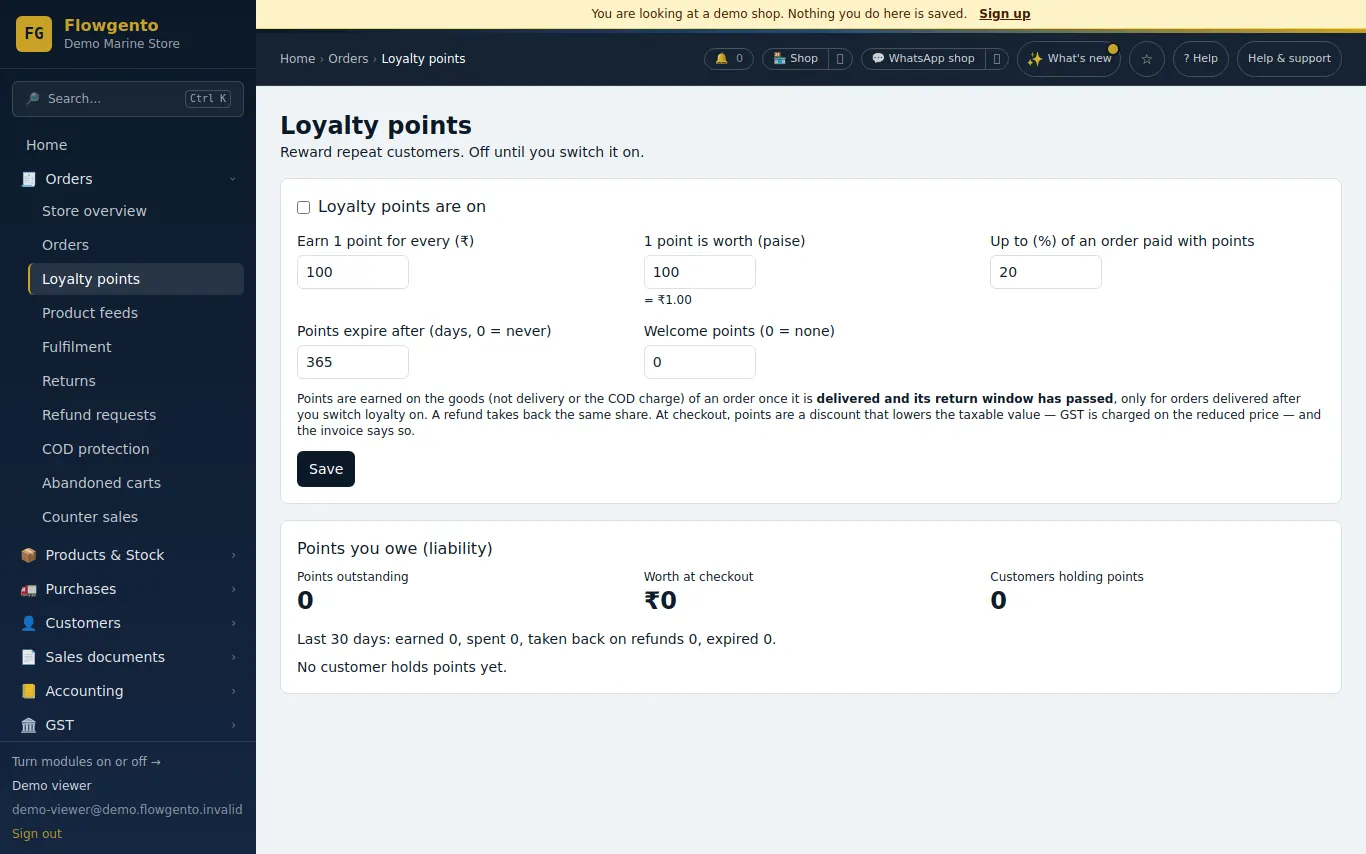
Loyalty points are off until you switch them on. You choose how many points an order earns, what a point is worth and how much of an order points can pay.
How it works
- Switch loyalty on and set the earn rate, point value, maximum share and expiry.
- Customers earn points when a delivered order's return window has passed.
- They spend points at checkout as a discount.
- You track points outstanding and their rupee value.
How points work
- Earn one point per ₹N of goods (you choose N), only on orders delivered after you switched loyalty on, once the return window has passed.
- Spend points at checkout as a discount spread over the lines before GST, up to the share of an order you allow.
- Expiry after the number of days you set, and optional welcome points.
Fair both ways
- A cancelled order returns the points spent on it.
- A refund takes back the same share of points earned and returns the same share of points spent.
- Customers see their balance, worth and next expiry in Your Account → Rewards; you see the points outstanding and their value.
See it in the demo shop
A read-only seller panel with invented data, reset every night.
Questions sellers ask
- Is it on by default?
- No. Loyalty is off until you switch it on, and orders delivered before that earn nothing.
- Do points reduce GST?
- Points work like a discount spread over the lines before GST, so tax is charged on the reduced price.
- What happens to points on a refund?
- The same share of points earned on the order is taken back.
- Can points expire?
- Yes, after the number of days you set.